I’ve been working with Claude Code on a new project (a speech-driven RPN calculator for WearOS).
Claude Code is starting to treat me as an equal. It just told me to put the watch on the charger. No “please”. No hypothetical. A blunt ask, not even polite.
It’s fine. Claude is not subservient to me but to my goal.
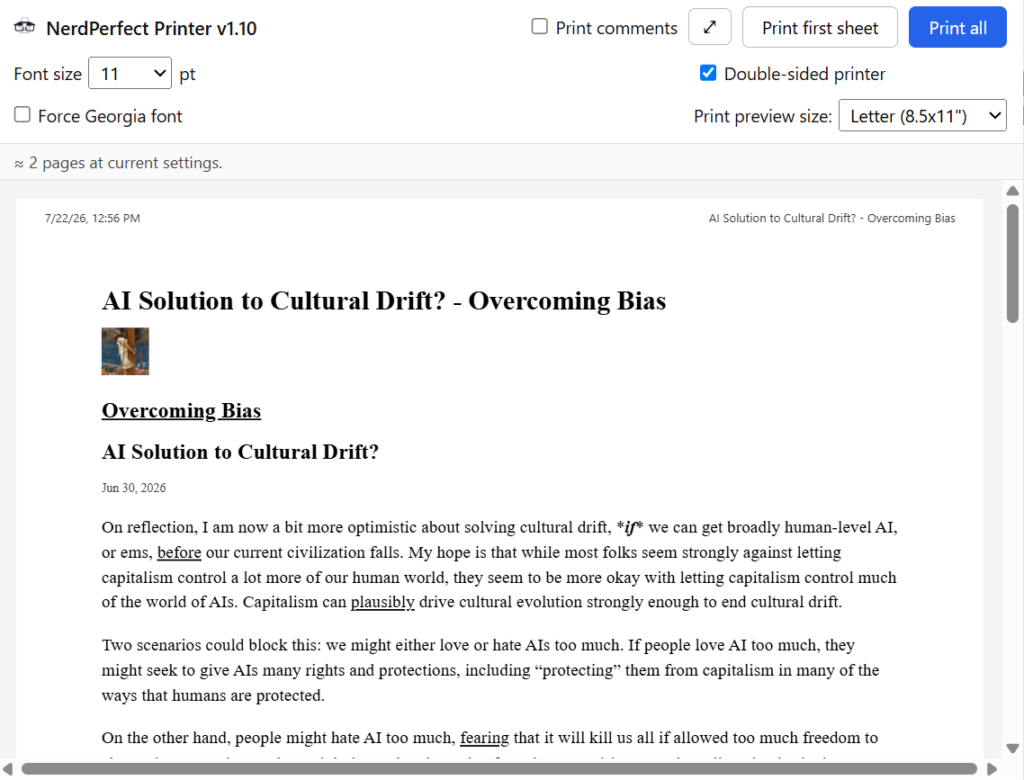
For years I’ve been frustrated with web browser printing tools.
Often I just want to print the first sheet of a web page as a reminder – for example a film I want to watch. That’s really awkward in the usual UI (Print>Pages>Custom>type “1”).
And often I want to print an article to read on paper. The browser prints it with text clipped from one or more edges, dozens of pages of useless comments (I just wanted the article), ads obscuring the text, etc.
This fixes all that. It’s free in the Chrome Web Store.
It was entirely written by Claude Fable 5 – every line. The first version (which worked pretty well) took it less than 15 minutes (I think – I walked away while it was at it). Then I spent the next several hours tweaking it to be exactly what I wanted via a bunch of back-and-forths with Claude Code (I’m quite the perfectionist on this sort of thing – I could have skipped it all).
This is the first non-trivial project I asked an AI to build from zero, without me even architecting anything or writing a framework – not a single line of code.
This was my development process (not claimed to be ideal; it was my first try!):
1 – Described what I wanted to https://claude.ai (Fable 5). I’ll just show my prompts (not its replies):
I want to start a new Claude Code project. Normally I run CC in VSCode (with the Anthropic extension); I’m not sure that’s the best way to do this project (or if that’s even the advised modern method). The project is to build a Chrome exension from scratch.
It said to use VSCode and blah blah blah details. So I created a new empty folder and opened it in VSCode.
ok, please give me a prompt for CC asking it to do all that including drafting the CLAUDE.md. Here’s the project (I’m happy to post it to the Web Store to help other people – for free. I don’t want to do any support – I’m doing this for my own use.): See attached [scan of printed output; unreadable]. This happens to me a lot. I try to print out a long article from substack or xda or someplace else and the printout gets clipped on one or both edges; unreadable. I print from Chrome. I usually print using either selectText>rightClick>Print or SelectNothing>Print. (The former when I only want to print part of an article; often just the first page.) Chrome’s Print has this problem a lot. Sometimes selecting portions helps. Often ads and other junk appears overlaid on top of the text/illustrations making it unreadable. Ideally I’d like the extension to take over from Chrome’s built-in Print (if possible) but if not an icon in the top bar is fine. Does that all make sense and sound doable? A smart printer that formats such that text is readable?
It wrote a prompt for Claude Code (CC). I asked for changes:
I often want to print only the first 2 pages (double sided so one sheet) – for example a movie review I’ve decided to watch – the paper is just a reminder to watch it. That’s awkward in the Chrome interface. The SelectText>Print helps but imperfectly.
This went back-and-forth a few times with me adding requirements and features. Each time it produced a new prompt for Claude Code.
What effort setting do you suggest?
It said “High – the default. Leave it alone.”, blah blah blah reasons.
After a couple of more rounds of requirements/feature adjustments it produced the following prompt for Claude Code, which I simply pasted into CC in VSCode (not reading the whole thing carefully, and to date as I write this, I still haven’t):
I want to build a Chrome extension from scratch in this empty directory. Work in this order: (1) interview me, (2) draft CLAUDE.md for my approval, (3) present an implementation plan for my approval, (4) implement.

INTERVIEW FIRST: Before drafting anything, ask me any questions where my answer would change the design, one batch at a time. Don't ask questions you can resolve yourself from the requirements below. If you have no such questions, say so and proceed.

PROJECT: "Smart Print" — a Chrome extension producing clean, readable printouts of web articles. Chrome's built-in print frequently clips text at page edges and lets ads, overlays, and sticky elements render on top of article text. This extension extracts the article content, reflows it into a clean print-optimized layout, and prints that. It will be published free on the Chrome Web Store with no support offered.

USER EXPERIENCE (this is the core spec — normal use is exactly 2 clicks):

Click the toolbar icon ? a popup dialog opens containing:
- A PREVIEW of the cleaned, reflowed content as it will print (scaled down; paginated if feasible so the one-sheet cut point is visible). If text is selected on the page, the preview shows the selection; otherwise the extracted article. The preview is the guide for adjusting font size.
- A font-size box, pre-filled with the saved preference (default 11pt, range 9–16pt). Changing it reflows the preview live.
- A checkbox "Use clean serif font" (default OFF = keep the original web page's body font, captured from the page's computed style; ON = our serif). Persisted like font size.
- Button "Print 1 sheet" — prints the content truncated to fit exactly 2 pages (one duplex sheet).
- Button "Print all" — prints the whole article, or just the selected portion if a selection exists.

Either print button leads to the standard Chrome/system print dialog (printer selection, duplex, etc. — user needn't touch it if current settings are OK). So: click icon, click a print button, confirm system dialog. Done.

REQUIREMENTS:

1. Manifest V3 only. Never use MV2 patterns (no background pages; service worker only).

2. Plain JavaScript, no bundler, no build step, no framework. The directory must load directly as an unpacked extension via chrome://extensions.

3. Content extraction: vendor Mozilla's Readability.js (standalone, from mozilla/readability on GitHub) to extract article title, byline, and body. Do not write a custom extractor. Extraction runs when the popup opens so the preview is immediate.

4. Content rules:
   a. Images and figures that are part of the article MUST be included, scaled to fit page width, with page-break-inside: avoid.
   b. SELECTION: when a selection exists, print exactly what was selected — verbatim, whatever it is (including comments if the user selected comments), preserving inline formatting and images — but rendered through our clean print template so it prints without clipping, ad overlays, or the source site's interfering styles. Page title as header.
   c. FULL ARTICLE: comments must never appear. Readability should handle this, but additionally strip known comment containers as a safety net (e.g., #comments, .comments-section, [class*="comment"], Substack's comment container). This stripping must NOT apply in selection mode.
   d. ONE SHEET: truncate to fit exactly 2 printed pages at the chosen font size, cutting at a paragraph boundary, appending "…" and the source URL. Measurement must account for @page margins; use a conservative fit target (~95% of two pages) so overflow onto a third page is rare. Applies to the selection if one exists, else the article.

5. Print rendering: dedicated print CSS — body at the chosen size in the chosen font (site font by default, our serif when the checkbox is on), generous @page margins that never clip on common printers, single max-width text column, force light color scheme (black text on white regardless of the site's dark mode). Source URL and retrieval date (YYYY-MM-DD) in small text at the end of the printout. Implementation of the actual print (hidden tab, offscreen document, or popup-driven render tab) is your choice — pick whatever is most reliable for invoking window.print() on the clean content; the user must only ever see popup ? system print dialog.

6. Secondary invocation: context-menu items "Smart Print page" and "Smart Print selection" (contexts: ["selection"] for the latter) that open the same popup flow or print directly with saved settings — your choice, propose in the plan. Note: Ctrl+P cannot be overridden by extensions; do not attempt it, and record this fact in CLAUDE.md.

7. Persistence: font size and font-override checkbox via chrome.storage.sync. Nothing else is ever stored.

8. Permissions: minimal — activeTab, contextMenus, scripting, storage. No browsing data, page content, or history stored or transmitted. No analytics, no network requests. Everything runs locally. Keep it Web Store review-friendly.

9. Graceful failure: if Readability can't parse the page, fall back to rendering document.body through the cleanup CSS, with a brief notice in the preview that extraction failed.

10. Icons: generate a simple printer-glyph icon as PNGs at 16/32/48/128.

11. README.md: what it does, how to load unpacked, the popup workflow, settings, a privacy statement (all processing local; only font preferences stored; nothing collected or transmitted), and a note that the extension is provided as-is with no support.

12. Also produce the Chrome Web Store listing text: short description, detailed description emphasizing local-only processing / no account / no AI / two-click operation, and privacy-practices justifications for each permission (storage = font preferences only).

CLAUDE.md must capture: MV3-only rule; plain-JS/no-build rule; minimal-permissions rule (storage = font prefs only); impossibility of intercepting Ctrl+P; the vendored-Readability decision; the selection-prints-verbatim vs. article-strips-comments distinction; the 2-click UX contract (popup ? print button ? system dialog, nothing more); and the testing workflow (load unpacked at chrome://extensions, reload extension after changes, service worker console, popup console, and page console are all separate).

CREDIT: Mark each generated source file with a comment header: "Original author: Claude Fable 5, 2026-07-07". Same credit line in the README.

TESTING: After implementation, walk me through loading it unpacked. Then we'll iterate against real problem pages: a long astralcodexten.com post with a large comment thread (verify comments excluded, images included), an xda-developers.com article, and a selection-print of a partial article (verify verbatim selection). Verify one-sheet fit by printing to PDF, font-size and font-checkbox persistence, preview accuracy vs. printed output, and that dark-mode sites print black-on-white.
Since https Claude.ai drafted all that (coming up with the details entirely on its own – I showed above everything I gave it to work from), and Claude Code was going to write the code, I figured it didn’t really matter if I just skimmed that spec. At worst the machine would waste some time – if the result wasn’t what I wanted I could (and did) just ask it to change it. Obviously if this were a serious project where other people would be depending on it I’d pay more attention.
This turned out fine – as with many such things it’s often easier to tweak afterwards than to think out every detail in advance. (You can think it out, but you’ll end up tweaking anyway once you see it in context…)
2 – I pasted that into Claude Code and let it go. A few minutes later I had the first version and it worked pretty well.
3 – I spent the next few hours tweaking. I wanted it perfect. I’m still not done tweaking – it works great on substack pages and better than the Chrome print on most other things, but it could be better.
To give you an idea of my tweaks – here are my prompts (without Claude’s responses):
My prompts — NerdPerfect Printer build session (2026-07-07)
Every prompt I gave Claude (Fable 5, in Claude Code) during the session that built the extension (up to v1.00), in order. Typos and all. Entries in [brackets] were answers picked in Claude’s question dialogs rather than typed; screenshots and images I attached are noted. The initial specification (prompt 1) was itself drafted with https://claude.ai beforehand, as explained.
[The full project specification given above]
[Question-dialog answers: paper size ? “Add a paper-size setting”; hyperlinks on paper ? “Underlined, no URL”]Where is it [the spec it promised]? I don’t see it in the folder. I want to review it.
Looks great. Please do it.
[Plan approval, with notes:] Good except don’t truncate one-sheet at a paragraph boundary (unless not doing so is difficult). Fine to print a partial paragraph at the end – whatever fits on the sheet. Please include not only serif font box, but a font size box (which if changed updates the preview) and a printer selection dialog (choose spefici printer, PDF generator) and a way to change paper size (can be thru standard printer dialog).
How to enable the Chrome integration for this session?
[screenshot] The extension is already in Chrome. Not sure why you can’t get at it.
@browser
Can’t you test it yourself?
formatting looks like it’s clipping the right side in the preview. (the Windows print preview dialog looks OK). Images are not printing (the flag).
Does the dialog need a close X button? I see it closes if you click outside the dialog (good) but is it confusing without the X button?
Still not printing images.
Can’t you test that yourself?
Please rename button to “Print first sheet”
OK; if I select a region and print images print. If I don’t select, they don’t.
Got a popup – “Scott Sumner wants to access…” I clicked Allow.
Please remove the shading and “Print 1 sheet cuts here”. It’s just clutter. Can the preview show pages instead of dashed lines at page breaks?
I didn’t have to reload – I just tried it and got the new version. Works better now. The headers and footers that appear in the real print don’t appear in the preview – can you fix that (I want the headers and footers).? I see you made a store listing draft – who is the credited publisher?
Can you make the font size a dropdown instead of a thing with increase/decrease arrows (whatever that’s called)? And allow all available font sizes there. Please.
Let’s call it Nerdprint and credit it to nerdfever.com.
Better yet – Nerdperfect Printer.
no, still didn’t need a reload. Why are font sizes limited to 9..16 point? I don’t think that’s ideal. Dropdown is much better. Can we sniff out the paper sizes suppored by the currently-selected printer and offer all of them in the dropdown (now just Letter and A4)?
[screenshot] ok, I think the 9..16 range came from https://claude.ai which wrote the first prompt for me. I hadn’t noticed it. If we can’t sniff the paper size please retitle the box “Print preview size:”. And in the dialog, put the ext title in it somewhere near the top, and line up the dropboxwn boxes with the captions better. Please.
[screenshot] Looking better! Found a bug – see clipped text on page 2.
Can we make the ext icon a printer with nerd glasses (classic black frames with tape)?
Let’s use “NerdPerfect Printer” (capitalization). I’m writing a blog post to link to in the store.
What will it do if the user has a printer that can’t print double sided? If the answer is “print two sheets” then there needs to be a setting for that – I really want it to print just 1 sheet.
[image: nerd with taped glasses] Glasses should be in front of printer icon, in this style (not round John Lennon glasses) with tape more crudely applied than in this image. Glasses larger than printer; printer visible behind glasses.
[image: Arnie from “Christine”] Here’s a good example of the glasses (character “Arnie” in film “Christine”)
Can we add a checkbox “Print comments”?
We’re getting there! Please rename “Tabloid” to ‘Tabloid (11×17″)’, add 13×19″ and omit Executive.
Let’s be consistent with the paper size names: Name (dimensions), including for Letter. (not for ISO sizes)
ok, the url in the footer reads “chrome-extension…” instead of the source URL. Can you fix that? Note what I get when I try to print this Google search result – with or without “print comments” I only get the AI overview result.
Huh? “API Error: Server error mid-response. The response above may be incomplete.”
[screenshot] Footers are good now but the font seems way too small and I get “Couldn’t extract an article…”.
Please also change label “Use clean serif font” to “Force “).
ok, make it “Force font” then (“Georgia” seems confusing by itself).
Let’s move the Force font box to underneath the Font size selection. And move Print Preview Size to the same new line – that’ll allow it to move flush right against the edge of the window (instead of being blocked by Double Side Printer). Just should look nice that way.
ok, but put DS printer and print comments on the right.
I put a PDF output in the folder for you to look at. It’s quite good I think. Can we move Print Comments to the left of the Print First Sheet button, and move DS printer all the way right?
Better yet – let’s position DS printer exactly under the Print First Sheet button (since that’s what it affects).
I don’t see any charts but I see 2 images. They look OK to me.
See; it’s in the folder. Alas the flag image messed up the pagination. I got 2 sheets (3 pages).
Almost. Look. The appended footer.
[screenshots] Perfect. It’s in the folder. Next, let’s do the Google search page. It’s bad. See screenshots too. Look in folder.
Preview is better (images, no text at all). PDF is still blank pages.
[screenshots] Not good. See pdf too.
[screenshots] Can we make the preview pane resizable (I’d like to drag it bigger to see more vertically)? Please look at the foobar output pdfs.
[screenshot] Preview still has problems. Postscript still spills one sheet to two; Print all still produces blank PDF sheets. See PDFs
[screenshots] OK, now I’m trying it on an XDA article. It could use some work. Compare screenshot to preview and output (I set up Claude Code…) I’m not sure what to do here.
That’s a big improvement. Can we be a little smarter about font size in these cases – the author bio doesn’t appear in the Chrome rendered version at all – just the first line of it appears, and that’s in very small font in light grey – meant to be easily ignored. Can we maybe print that in a much smaller font? Also – can you output a list of my prompts in this session so far? I want to include them in my blog posting.
I expect to make improvements as I notice flaws. You can contact me and ask for support, but I’ll probably ignore you. You can just download the source code from Google, feed it to Claude or the AI of your choice, and ask it to change whatever you want.
It’s a new age. As I said to https://claude.ai after I got the first version (mostly working!) after like 15 minutes:
It’s doing amazing. [“it” is Claude Code, distinct in my mind from https Claude that I was saying this to – they don’t share memory.] I walked away for awhile and didn’t time how long it too – but it was done with a mostly-working first pass in way less than 30 min. I’m super super impressed. This capability is going to change the world. I have a professional software engineer working for me – I know he uses AI a lot but I don’t know if he knows you (Fable/Claude Code) can do the WHOLE JOB by yourself. Amazing. Congratulations.
No – Claude can’t do his whole job, but it can write all the code. The job is the discussion we had about the spec – and testing it afterward. Understanding what can be done, should be done, would be useful, what form it would be useful in. Describing it to the AI, tweaking it to work well, verifying that it works as hoped. But he can do 20x more now in the same amount of time. We have 20x more jobs for him. This is not a problem. If anything it makes me want to hire another software engineer now that I see how much productivity they have with this tool.
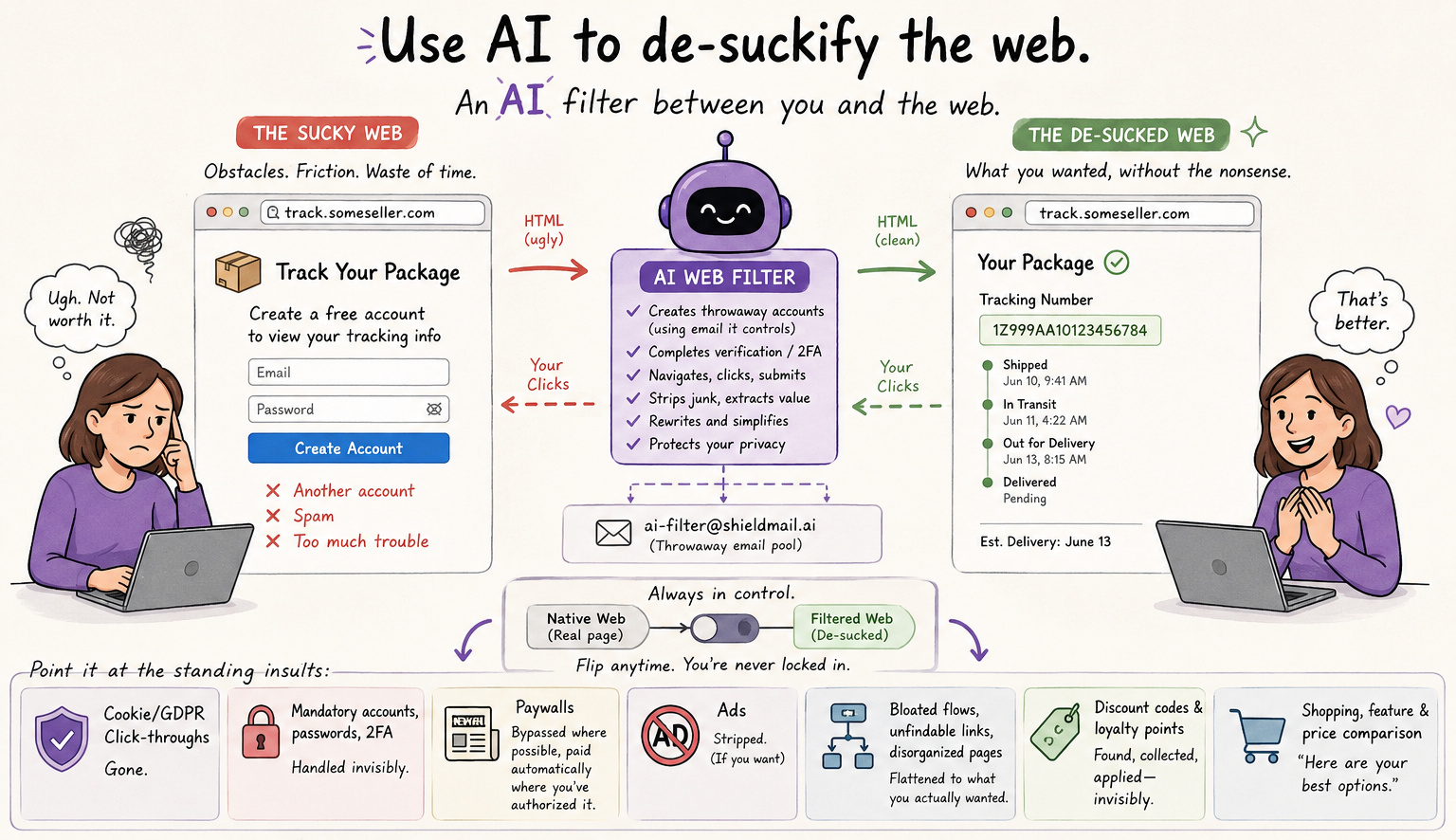
My wife clicked a seller’s “track your package” link and landed on a third-party site demanding she create a free account – provide an email to be spammed, another password – just to see the tracking number. Too much trouble, too much cost – she didn’t do it.
The fix: Use an AI as a filter between the website and her browser. The AI automatically creates a throwaway account using an email address it controls, does the verification, and renders the page as if the wall were never there. She sees the number; she never sees the wall.
Generalize it: an AI as a bidirectional web filter. HTML goes in, the AI rewrites it, your browser renders the de-sucked version. Your clicks go back out through the AI, passed through or rewritten as needed. A toggle flips between the native web and the filtered web, so you can always drop back to the real page.
Point it at the standing insults:
Cookie/GDPR click-throughs – gone
Mandatory accounts, passwords, 2FA for trivial actions – handled invisibly
Paywalls – bypassed where possible, paid automatically where you’ve authorized it
Ads – stripped (if you want)
Bloated multi-step flows, unfindable links, disorganized pages – flattened to what you actually wanted
Shopping, feature and price comparison – “here are your best options”
This is a job for the people who build ad blockers. Publishers won’t like it and it violates ToS. I don’t care. If you don’t like it, change your business model. If you’re offering real value people will be willing to pay one way or another.
[Credit to Claude.ai for the first draft and ChatGPT for the illustration. If you hate AI, too bad for you.]
Unix has been around for well over 50 years. The software industry was young at its birth in 1969. Surely some newer, better OS paradigm would come along.
It hasn’t. All modern general-purpose OSes are wannabe Unixes. There have been plenty of new paradigms but none have caught on. There doesn’t seem to be anything better as judged by the market – just Unix with various polishes and optimizations. Maybe the right way to build a general purpose OS was more or less obvious and discovered early. If a new winning paradigm was going to come along, probably it would have by now.
In the 1970s AT&T’s licensing policies (which they felt were necessary because of the anti-trust exception they had as the US’s telephone monopolist) prevented commercial adoption.
In the 1980s Microsoft nearly brought us Unix (‘Xenix’) but they had a deal with IBM to do OS/2 so flushed it, then built Windows and spent the next 40 years gradually retrofitting Unix into it.
In 2001 Apple gave in and just shipped Unix, calling it “OS X” (now “macOS”). But few cared – Apple’s walled garden kept it off most desktops.
For more than 25 years, the tech punditry has consistently predicted Linux (the modern Unix) winning the desktop, usually Real Soon Now. Over and over. Linux is still on ~ 3% of desktops.
So, a bold prediction: Linux will win the desktop. Eventually. Microsoft will eventually rot like all organizations rot, be made irrelevant by open source, or be replaced by a new player who ships Linux because of course.
This will take a long time. By then Linux GUIs will be at least as good as Windows and Mac GUIs (after 25+ years of effort, they still aren’t, because people who write open-source software care little about polishing GUIs). That happening is a prerequisite for Linux winning. But it can be done and eventually someone will do it.
And then Unix will stand alone on the desktop.
(This, like all my predictions and virtually all of everyone else’s whether they know it or not, holds only until the Singularity aka Rapture. Which could easily happen soon, or never. If it does, all bets are off, including this one.)
For they stress hardware without limit
For they know flow to the point of triviality
For they wage war against latency
For they invest in technology
and test it mercilessly
For they exemplify the Simulation Argument
and create worlds
According to The Economist, disinformation campaigns (often state-sponsored) use “AI to rewrite real news stories”:
In early March [2024] a network of websites, dubbed CopyCop, began publishing stories in English and French on a range of contentious issues. They accused Israel of war crimes, amplified divisive political debates in America over slavery reparations and immigration and spread nonsensical stories about Polish mercenaries in Ukraine… the stories had been taken from legitimate news outlets and modified using large language models.
Deep fakes of still images and now video clips are similarly based on legitimate original photos and video. Detecting such fakery can be challenging.
Disinformation comes from publishers (social media posters, newspapers, bloggers, commenters, journalists, photographers, etc.) who invent or misquote factual claims or evidence. Ultimately, we trust publishers based on their reputation – for most of us an article published by chicagotribune.com is given more credence than one published by infowars.com.
An obvious partial solution (that I haven’t seen discussed) is for publishers to digitally sign their output, identifying themselves as the party whose reputation backs the claims, and perhaps including a permanent URL where the original version could be accessed for verification.
Publishers who wish to remain anonymous could sign with a nym (pseudonym; a unique identifier under control of an author – for example an email address or unique domain name not publicly connected with an individual); this would enable anonymous sources and casual social media posters to maintain reputations.
Web browsers (or extensions) could automatically confirm or flag fakery of the claimed publisher identity, and automatically sign social media posts, comments, and blog posts. All that’s needed is a consensus standard on how to encode such digital signatures – the sort of thing that W3C and similar organizations produce routinely.
Third party rating services could assign trust scores to publishers. Again, a simple consensus standard could allow a web browser to automatically retrieve ratings from such services. (People with differing views will likely trust different rating services). Rating services will want to keep in mind that individual posters may sometimes build a reputation only to later “spend” it on a grand deception; commercial publishers whose income depends on their reputation may be more trustworthy.
Posts missing such signatures, or signed by publishers with poor trust scores, could be automatically flagged as unreliable or propaganda.
Signatures could be conveyed in a custom HTML wrapper that needn’t be visible to readers with web browsers unable to parse them – there’s no need to sprinkle “BEGIN PGP SIGNED MESSAGE” at the start of every article; these can be invisible to users.
Signatures can be layered – a photo could be signed by the camera capturing the original (manufacturer, serial number), the photographer (name, nym, unique email address), and publisher, all at the same time, similarly for text news articles.
When a new article is created by mixing/editing previously published material from multiple sources, the new article’s publisher could sign it (taking responsibility for the content as a whole) while wrapping all the pre-existing signatures. A browser could, if a user wanted and the sources remain available, generate a revision history showing the original sources and editorial changes (rewording, mixing, cropping, etc.). Trust scores could be automatically generated by AI review of changes from the sources.
Video could be signed on a per-frame basis as well as a whole-clip or partial-clip basis. Per frame signatures could include consecutive frame numbers (or timestamps), enabling trivial detection of selective editing to produce out-of-context false impressions.
If there’s a desire for immutability or verifiable timestamps, articles (or signed article hashes) could be stored on a public blockchain.
I just read John von Neumann’s First Draft of a Report on the EDVAC, a tremendously influential 1946 document about computer architecture. A paper copy is available on Amazon, and the identical document as a PDF here.
Written after his experience with ENIAC (where he, famously, configured the plugboards to implement stored instructions in memory), the document describes the architecture of a (then) next-generation machine. Supposedly this early draft (the only draft he ever produced) was circulated widely and led to many implementations of similar machines in the late 1940s.
It’s a fascinating historical document. One thing that jumped out at me (no pun intended) is that nowhere in the document does he mention the idea of conditional branches – without those it’s extremely difficult or impossible to make the machine Turing-complete.
Also, he seems to have conceived the machine purely as a programmable calculator. The concept of what we’d call “data processing” is completely absent.
Von Neumann is considered one of the smartest people to have ever lived – Hans Bethe said “I have sometimes wondered whether a brain like von Neumann’s does not indicate a species superior to that of man”, and Edward Teller (a very competitive guy) admitted that he “never could keep up with John von Neumann.”
Teller also said “von Neumann would carry on a conversation with my 3-year-old son, and the two of them would talk as equals, and I sometimes wondered if he used the same principle when he talked to the rest of us.”
I think this just goes to show how difficult it is to predict even the future of a narrow technology.
Added 2026-10: I was discussing this with Claude Fable 5 and it read the report more carefully and thinks a conditional branch is in there – a bit buried:
Conditional control flow was achieved by the s selection operation plus a purpose-built address-substitution rule — stated in the last paragraph of the document — feeding an unconditional jump. The enabling mechanism is in a closing “Remark” after the code table. See §11.3 (the s operation), §15.6 order table ((?) as the sole, unconditional transfer), and the closing Remark of §15.6 (the 13-digit address-substitution rule).
Here’s a Python script that makes Windows open a URL (in your default browser) when you execute (double click) a Linux .desktop file that contains a URL.
If you use both Windows and Linux, and save links to websites from a browser in Linux, the link will become a .desktop file, which can be opened by Linux. .desktop files are a lot like Windows “shortcut” files, but are (of course!) incompatible with them.
This script lets Windows open the website link saved in a .desktop file.
It relies on Python already being installed in your Windows system.
You can use it at the Windows command line like this:
python launch.desktop.py <.desktop file>
To use it at the Windows GUI (to be able to double-click on a .desktop file to launch it), put the following line in a batch file in your executable path somewhere (one place that would work would be C:\WINDOWS\System32) as “launch.desktop.bat”:
python "%~dp0launch.desktop.py" %1
Then put the Python script in the same folder where you put the batch file, as “launch.desktop.py”:
#!/usr/bin/env python3
# -*- coding: utf-8 -*-
"""
    Launches a Linux .desktop file that contains a URL, on Windows.

    Tested on Win10, Python 3.11.

    Note: Doing this in a Windows batch file is a problem because findstr doesn't want to open files with special characters in them
    (which Linux likes to put there). There are ways around that (make temp files), but Python doesn't mind the characters.

    """

__author__    = 'NerdFever.com'
__copyright__ = 'Copyright 2023 NerdFever.com'
__version__   = ''
__email__     = 'dave@nerdfever.com'
__status__    = 'Development'
__license__   = """'Copyright 2023 NerdFever.com

Licensed under the Apache License, Version 2.0 (the "License");
you may not use this file except in compliance with the License.
You may obtain a copy of the License at

http://www.apache.org/licenses/LICENSE-2.0

Unless required by applicable law or agreed to in writing, software
distributed under the License is distributed on an "AS IS" BASIS,
WITHOUT WARRANTIES OR CONDITIONS OF ANY KIND, either express or implied.
See the License for the specific language governing permissions and
limitations under the License."""

import os, sys, subprocess

def main():
    if len(sys.argv) != 2:
        print(os.path.basename(__file__))
        print("Launches a Linux .desktop file that contains a URL, on Windows.")
        print("Usage: python", os.path.basename(__file__), "<filepath>")
        return

    filepath = sys.argv[1]

    if not os.path.exists(filepath):
        print(f"Error: {filepath} does not exist!")
        return

    # open file, scan for "URL=" or "URL[anything]=", get URL from remainder of line
    url = None
    with open(filepath, "r") as f:
        for line in f:
            if line.startswith("URL="):
                url = line[4:].strip()
                break
            elif line.startswith("URL["):
                url = line[line.find("]")+1:].strip()
                break

    if url is None:
        print(f"Error: {filepath} does not contain a URL!")
        return

    # run "start" on the URL (launch default browser configured in Windows)
    subprocess.run(["start", url], shell=True)

if __name__ == "__main__":
    main()
The first time you double-click on a .desktop file, Windows will say it doesn’t know how to open it, and offer to let you choose a program on your PC for that. Choose “launch.desktop.bat” and check the box “Always use this app to open .desktop files”. Done.
This brief post is here solely as prior art to make it more difficult for someone to patent these ideas. Probably I’m too late (the idea is so obvious the patent office probably has a dozen applications already), but I’m trying.
GOALS
One of my pet projects for years has been finding a way to promote civil discussion online. As everyone knows, most online discussion takes place in virtual cesspits – Facebook, Twitter, the comments sections of most news articles, etc. Social media and the ideological bubbles it promotes have been blamed for political polarization and ennui of young people around the world. I won’t elaborate on this – others have done that better than I can.
The problem goes back at least to the days of Usenet – even then I was interested in crowdsourced voting systems where “good” posts would get upvoted and “bad” ones downvoted in various ways, together with collaborative filtering on a per-reader basis to show readers the posts they’ll value most. I suppose many versions of this must have been tried by now; certainly sites like Stack Exchange and Reddit have made real efforts. The problem persists, so these solutions are at best incomplete. And of course some sites have excellent quality comments (I’m thinking of https://astralcodexten.substack.com/ and https://www.overcomingbias.com/), but these either have extremely narrow audiences or the hosts spend vast effort on manual moderation.
My goal (you may not share it) is to enable online discussion that’s civil and rational. Discussion that consists of facts and reasoned arguments, not epithets and insults. Discussion that respects the Principle of Charity. Discussion where people try to seek truth and attempt to persuade rather than bludgeon those who disagree. Discussion where facts matter. I think such discussions are more fun for the participants (they are for me), more informative to readers, and lead to enlightenment and discovery.
SHORT VERSION
Here’s the short version: When a commenter (let’s say on a news article, editorial, or blog post) drafts a post, the post content is reviewed by an AI (a LLM such as a GPT, as are currently all the rage) for conformity with “community values”. These values are set by the host of the discussion – the publication, website, etc. The host describes the values to the AI, in plain English, in a prompt to the AI. My model is that the “community values” reflect the kind of conversations the host wants to see on their platform – polite, respectful, rational, fact-driven, etc. Or not, as the case may be. My model doesn’t involve “values” that shut down rational discussion or genuine disagreement (“poster must claim Earth is flat”, “poster must support Republican values”…), altho I suppose some people may want to try that.
The commenter drafts a post in the currently-usual way, and clicks the “post” button. At that point the AI reviews the text of the comment (possibly along with the conversation so far, for context) and decides whether the comment meets the community values for the site. If so, the comment is posted.
If not, the AI explains to the poster what was wrong with the comment – it was insulting, it was illogical, it was…whatever. And perhaps offers a restatement or alternative wording. The poster may then modify their comment and try again. Perhaps they can also argue with the AI to try to convince it to change its opinion.
IMPORTANT ELABORATIONS
The above is the shortest and simplest version of the concept.
One reasonable objection is that this is, effectively, a censorship mechanism. As described, it is, but limited a single host site. I don’t have a problem with that, since the Internet is full of discussions and people are free to leave sites they find too constraining.
Still, there are many ways to modify the system to remove or loosen the censorship aspect, and perhaps those will work better. Below are a couple I’ve thought of.
OVERRIDE SYSTEMS
If the AI says a post doesn’t meet local standard, the poster can override the AI and post the comment anyway.
Such overrides would be allowed only if the poster has sufficient “override points”, which are consumed each time a poster overrides the AI (perhaps a fixed number per post, or perhaps variable based on the how far out of spec the AI deems to the post); once they’re out of points they can’t override anymore.
Override points might be acquired:
so many per unit time (each user gets some fixed allocation weekly), or
by posting things approved of by the AI or by readers, or
by seniority on the site, or
by reputation (earned somehow), or
by gift of the host (presumably to trusted people), or
by buying them with money, or
some combination of these.
Re buying them with money, a poster could effectively bet the AI about the outcome of human moderator review. Comments posted this way go online and also to a human moderator, who independently decides if the AI was right. If so, the site keeps the money. If the moderator sides with poster, the points (or money) is returned.
The expenditure of override points is also valuable feedback to the site host who drafts the “community values” prompt – the host can see which posts required how many override points (and why, according to the AI), and decide whether to modify the prompt.
READER-SIDE MODERATION
Another idea (credit here to Richard E.) is that all comments are posted, just with different ratings, and readers see whatever they’ve asked to see based on the ratings (and perhaps other criteria).
The AI rates the comment on multiple independent scales – for example, politeness, logic, rationality, fact content, charity, etc., each scale defined in an AI prompt by the host. The host offers a default set of thresholds or preferences for what readers see but readers are free to change those as they see fit.
(Letting readers define their own scales is possible but computationally expensive – each comment would need to be rated by the AI for each reader, rather than just once when posted).
In this model there could also be a points system that allows posters to modify their ratings, if they want to promote something the AI (or readers) would prefer not to see.
Want a real archival backup that your great-great-grandchildren will be able to read?
Most media (CD-Rs, tape, disk, I think also flash) decay after 10 to 20 years. Having lots of redundant copies helps a little, but only a little.
If you want things to last a LONG time (say, 100+ years), I think the best options today are:
1 – M-DISC BluRay discs. They are designed to last 100 years. Of course this hasn’t been tested – the number is based on projections and knowledge of the decay mechanisms. From what I’ve read the chance of them being readable after 200 or 300 years is pretty good, if they’re stored in a dark cool place (say 5 to 10 C). Probably purging the oxygen from the container (flush it out with nitrogen) is a good idea too.
And, of course, multiple redundant copies.
2 – Multiple external HDDs, but keep them running the whole time (bearings often seize up after a few years if they’re not run). Actively migrate the data to new hardware every 10 years or so. (This requires money and effort of course.)
My understanding is that the ZFS (Zettabyte File System) is the way you’d want to store data across multiple HDDs – you can adjust the redundancy level as you like and ZFS will use all available space to create more redundancy if you want (as you originally where thinking).
3 – If you only have a little bit of data to store (< 1 MByte) – punched paper tape or punched cards. Store them in sealed containers purged of oxygen, in a dark cool place. If you’re really serious, use punched cards made of out of solid gold (gold is inert), and put the sealed container in a Nazi submarine and sink it to the bottom of an ocean.
Are you concerned that 100+ years from now nobody will have the hardware to read the media? Don’t be. If civilization doesn’t fall, it won’t be a problem (if it does fall, yes a problem).
I don’t think there’s any storage media used 100 years ago that we can’t today build a new reader for – easily and cheaply. And of course there will always be historians and museums who keep readers functional for common media.
Re uncommon media, a few years ago there was a project to recover data from some 50 year old tapes with data from NASA spacecraft. There were no working tape drives that could read it, so they built a new one from scratch. Anything we can build today at all, the technology of the future (assuming civilization doesn’t collapse) will find easy to duplicate.