My God, it’s full of… disk drives!

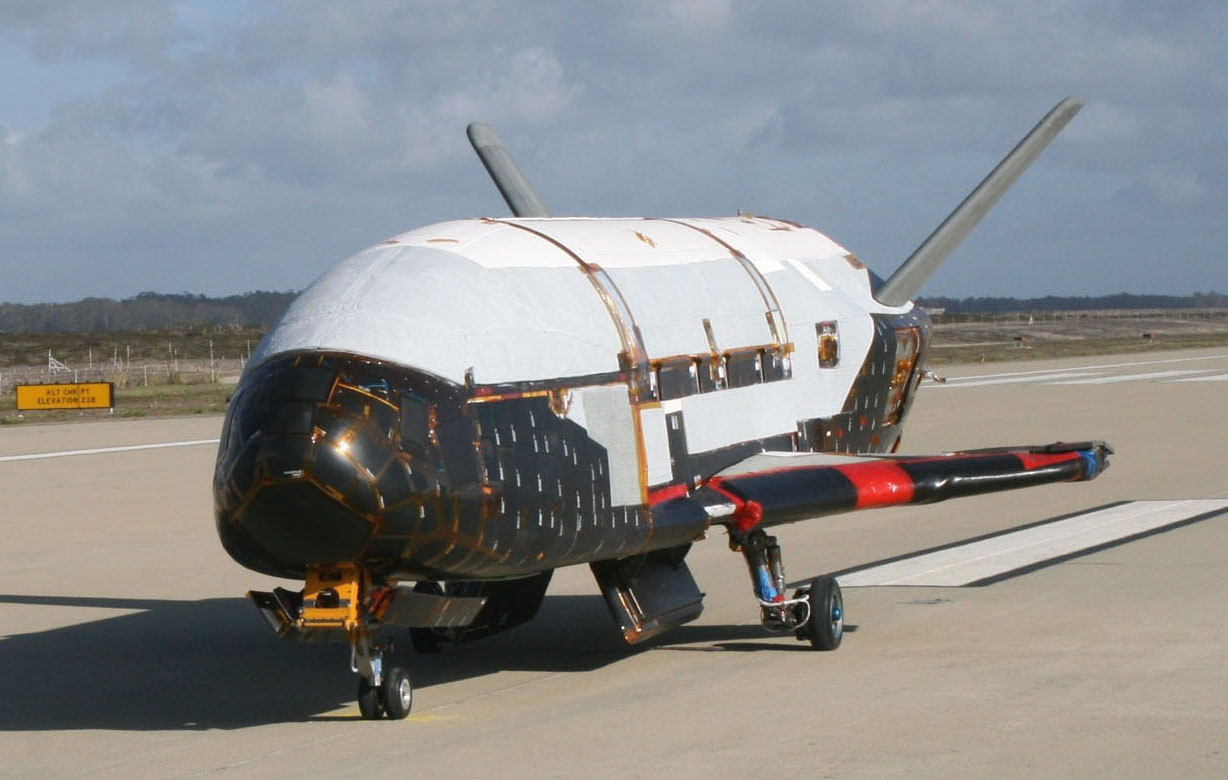
What’s going on with the X-37B?

X-37B (USAF photo)

read today that the USAF has launched one again, on, I think, the 3rd flight.

What is unique about this vehicle compared to most other space systems is:

  • It’s reusable and returns to Earth (lands on a runway, ala the Space Shuttle)
  • It has a long on-orbit dwell time (270 days was supposedly the spec, with the second flight lasting 469 days)
  • Some significant amount of on-orbit delta-v for orbital maneuvering
  • Payload capacity “similar to a pick-up truck”

What is this thing for? The government has been strangely silent about its purpose, leading to a lot of random speculation, none of which makes any sense to me. The only thing they’ve said is:

“The X-37B is a risk reduction vehicle for space experimentation and to explore concepts of operation for a long duration, reusable space vehicle.”

I’m sure that’s true to some extent, but I’m sure that’s not all that is going on; otherwise why all the hush-hush?

Some of the theories I’ve seen claim that it’s:

  1. For spying on the Chinese manned space program
  2. For spying on random spacecraft in orbit
  3. Some sort of on-orbit anti-satellite weapon
  4. For repairing satellites in orbit
  5. A ground-attack (or ICBM interception) weapon (rods-from-god or similar)
  6. An orbital bomber
  7. For stealing satellites, like in You Only Live Twice
  8. Some professor at the Naval War College said “the Air Force has always wanted a crewed space plane, and this was the closest they could get”.

None of those make sense. One at a time:

1 and 2 – Spying on other spacecraft

The DoD is already pretty good at pointing ground telescopes at spacecraft in orbit. Remember they offered to check out Space Shuttle Columbia’s missing tiles back in 2003? Matching orbits and a close approach to an opponent’s spacecraft would be tremendously provocative (it’s not as if you can do it secretly), and how much more can you really learn by looking at a spacecraft up-close vs. from a distance anyway? Not enough to justify this doubtless hugely expensive program, I’m sure. If despite that, you really want to do this, you don’t need a vehicle that can land. As for spying on the Chinese manned space program, why would that be of any interest at all? (Besides, it’s been in the wrong orbit for that.)

So I don’t buy those explanations.

3 – It’s an ASAT weapon

So why does an ASAT weapon need to land? No matter how much the thing costs, it’s got to be cheaper to just build and launch a new one every so often than land it, refurbish it, and re-fly it.

4 – Repairing satellites in orbit

That’s crazy. Maybe if it were manned; if that’s what you want to do it’d be way cheaper to fly repair techs on a SpaceX Dragon. And what possible purpose would there be in having the repair-bot sit on orbit for a year, or have the capability to land?

5 – Rods from God

Again, no need for such a thing to land. If you really want to build that, sure build it, but why complicate things by having it land? Makes no sense.

6 – Orbital bomber

First, that would violate the Outer Space Treaty. I can see people wanting to get out of that treaty, but I think the US would do so explicitly rather than in this not-very-sneaky way. But, again, why does it need to land? Maybe you can make a case that the USAF doesn’t want to leave nukes on orbit forever – they want a way to get them back eventually. But there are many simpler ways to accomplish that – it can de-orbit the warhead with a parachute (ala Corona, as well as the whole Apollo program), they could plan on a future OTV or manned spacecraft to collect warheads in 15 years, etc. Plus, who needs another way to deliver nukes anyway? The Soviets are not coming back, and the Chinese only want to sell us stuff.

7 – Pac-Man (waka waka)

Snatching someone else’s satellite out of orbit would be an act of war. And difficult, because you don’t know where it’s CG is or how much damage it’ll take by being bounced around on re-entry. And why do you need your snatch machine to sit on orbit for a year? You can always just launch it when you need it.

8 – Manned spacecraft wannabe

Except they already built the full-size version (that flying pink elephant, the Space Shuttle), and this one doesn’t carry anybody. And a Dragon will be way cheaper, and NASA is already funding that. Not to mention Orion (oops… too late, I mentioned it. It’ll probably never fly anyway.) And, of course, they’ll have trouble getting even one brave soul to sit in a space the size of a pickup truck bed for a year (let alone finding room for oxygen, water, and food for that duration).

So what’s it for, then?

OK, here’s my theory. It’s a spy satellite full of disk drives.

The payload bay has some sensors, probably high-resolution cameras; maybe other things too. The rest of the payload is disk drives.

The X-37B collects data (pictures, maybe sigint, maybe other things), and stores it on the disk drives. Every so often it changes orbits in order to be able to look at some particular thing at particular times (or just to keep the other guy guessing). Once the disk drives are full (a year or so), or sooner if the data is needed on the ground sooner, it lands.

It lands so that the data on the disk drives can be read off.

Why not just radio the data down? Because there is way, way, too much of it.

Suppose the payload bay is 4 x 8 x 3 meters (roughly a full-size pickup truck bed). That’s 96 cubic meters (96 million cc). A 3.5″ hard drive is 101.6 x 25.4 x 146 millimeters, that’s 377 cc. So there’s enough room for about 250,000 drives. Figure a tenth of that after allowing room for the sensors, power supplies, and cooling (cooling is a big deal in space). 25,000 drives at 3 TBytes each is 73 petabytes. (BTW, that’s about $2.5M worth of disk drives; peanuts for the DoD.)

73 petabytes over a year is 25 gigabits/second. That’s 24×7, including when not over a convenient ground station.

How does that compare with the bandwidth available for a satellite downlink? I don’t know exactly, but the whole X-band is only 500 MHz, as is the Ku band. The Ka band is 2.5 GHz. That’s the whole band. You do the numbers.

[Edit, March 2013: There’s a mistake in the numbers above – a pickup bed is about 4 x 8 x 3 feet, not meters. But on further thought the X-37B is almost certainly using SSDs instead of rotating media, and the density of that is a lot higher. So I think the two mistakes roughly cancel out, without changing the conclusion.]

What can you do with that?

The Earth’s surface area is 510 million square kilometers (about a third of that is land). Let’s assume 24 bits/pixel (you can divide that up into bands as you like). Unless I made a mistake in the math, 73 petabytes is enough for pixels 40 centimeters on a side, of the whole planet.

Or, somewhat bigger pixels, but multiple copies in the disk drives, so hardware on-board the spacecraft can compare old images against new ones, and identify differences. You get the idea.

Makes Google Earth look kinda…lame.

[Disclaimer: This is just a guess; I have no inside info. Just imagination and a calculator.]

How to add the “sent” label to GMail messages

…or, how to “move” GMail messages to the “sent” folder. (GMail uses labels, not folders, but if you use 1 label/message you can emulate folders.)

This is my last posting about GMail for a while (I hope!). 5 posts down, you can see that I completely revised my July 20 posting about migration to GMail – it’s finally done.

GMail’s web interface won’t let you move messages into the “sent” folder, but you can do it if you sync your account with Outlook, then do it in Outlook:

  1. Install Google Apps Sync for Microsoft Outlook®.
  2. Install Outlook (I used Outlook 2003).
  3. Synchronize Outlook with the GMail account (this may take a long time – days – if you have a lot of mail)
  4. Move the messages in Outlook.
  5. Let it sync again.

That’s it. Now you can get rid of Outlook if you want.

How to remove un-labelled mail from GMail

I had over 80,000 un-labelled messages (6.8 GBytes) in GMail. I wanted to delete them.

Guess what – there’s no way to select messages without any labels. Google’s own help files say “There isn’t a search operator for unlabeled messages“.

It seems I’m not the only one with this problem. After a Google search on the problem, I discovered that the only known method is to search using the “-label: ” operator that finds messages that don’t have a given label. If you have 4 labels you can search on messages that don’t have any of the 4 like this:

-label:Label1 -label:Label2 -label:Label3 -label:Label4

or

-label:{Inbox Outbox label1 Label2 …} // only for single-word labels

Which is fine if you only have four labels. I had hundreds of labels.

Google support said there was no way to delete just the unlabeled ones, except by hand.

But there is.

  1. Install Google Apps Sync for Microsoft Outlook®.
  2. Install Outlook (I used Outlook 2003).
  3. Synchronize Outlook with the GMail account (this may take a long time – days – if you have a lot of mail)
  4. Exit Outlook (important!)
  5. Go into GMail, select “All Mail”, click on “Select all messages that match this search”.
  6. Delete all the mail in the GMail account.
  7. Run Google Apps Migration for Microsoft Outlook® (this gets installed automatically when you install Apps Sync)
  8. Migrate your Outlook .PST file (the account you synced in step 3) to your GMail account.
  9. Restart Outlook. Let it sync with GMail (may take a long time – it’ll transfer the entire account).

You’re done. You can un-install Outlook now if you don’t want to use it (you don’t have to; it’ll stay synced with GMail).

I did this. It works. Now I have only the 792 messages that actually have labels.

Dropbox is still better than Google Drive

[Update 2014: This is obsolete. Google Keep solves the problem better now.]

In July I switched from an iPhone to a Galaxy Nexus running Android Jellybean.

I was fed up with Apple’s sue-happy arrogance and with being locked to AT&T (I travel; AT&T’s international roaming rates are highway robbery).

Plus Jellybean just looked like a more advanced platform. Google’s price of $350 unlocked and usable anywhere in the world was a great deal. When Apple got an injunction against the Galaxy Nexus, I pulled the trigger and snapped one up before it got yanked off the market.

Back in 2009 I went thru a painful transition from the Palm Treo to the iPhone. One of the big issues then was getting my memos onto the iPhone in a form that was:

  • Synchronized with the PC (so I can edit on either device)
  • Reasonably secure (encrypted sync)
  • Editable offline (on either the PC or the phone)

My solution was to store memos in the “notes” field of address book entries. This synced securely with Google Contacts and I could edit my memos offline. It worked great.

Unfortunately the Android version of Google Contacts has a limitation on the size of the “notes” field. Neither the iPhone or the web version of Google Contacts have this problem, but I had plenty of memos that were too long to read on Android.

So I decided to move the memos into Google Drive (ex-Google Docs) files, thinking I could edit those on the phone or PC.

It turns out you can’t edit Google Drive documents when you’re offline. Also, the Google editor is complex enough to take an annoyingly long time to start on the phone (when I just want to check my shopping list).

But Dropbox works great:

  • Store the memos in Dropbox as plain text.
  • Put a shortcut to the memos folder on your “links” toolbar in Windows
  • Put the Dropbox widget (direct link to the memos folder) in the Android dock
  • Mark the memo files with a star (“favorite” them), so Dropbox will cache them locally in the phone for offline access.

That’s it. You can edit either on the PC or phone, and it syncs securely. It’s even smart enough to create a “conflict” copy if you make conflicting changes on the PC and phone.

I’m disappointed with Google Drive – this should be easy. And I don’t see why they put the size limit on Android address book notes (when there isn’t one on the PC or iPhone).

I’ll say this – the transition to Android was easy; nothing like the nightmare moving to the iPhone.

I think Apple has started a long, slow descent into irrelevance. They must think so too – winners compete, losers sue.

Questions are more valuable than answers

…at least if you’re Google.

The interesting site Terms of Service; Didn’t Read gives Google a thumbs-down because “Google can use your content for all their existing and future services”.

I don’t think a thumbs-down is really fair here – I mean, that’s the whole point of Google.

Google is a service that gives out free answers in exchange for valuable questions.

Answers are worthless to Google (though not to you) because Google already knows those answers. But it doesn’t know your questions. So the questions are valuable (to Google, not to you). Because Google learns something from every question.

When you start typing a search into Google and it suggests searches based on what other people have searched for, that’s using your private information (your search history) to help other people. They’re not giving away any of your personal information (nobody but Google knows what you searched for or when), but they are using your information.

Google gets lots of useful information from the questions that people ask it. It uses that information to offer valuable services (like search suggestions) to other people (and to you), that they make money from (mostly by selling advertising).

That’s not a bad thing. It’s the only way to do many of the amazing, useful, and free things that Google does. I’m perfectly fine with it, but you have to more-or-less trust Google to stick to their promise to keep your private info private.

I think Google does a lot more of this than most people suspect.

When you’re driving and using Google Map to navigate, you’re getting free maps and directions. But Google is getting real-time data from you about how much traffic is on that road, and how fast it’s moving.

When you search for information on flu symptoms, Google learns something about flu trends in your area.

Sometimes I ask Google a question using voice recognition and it doesn’t understand. After a couple of tries, I type in the query.  I’ve just taught Google what I was saying – next time it’s much more likely to understand.

When you use GMail, Google learns about patterns of world commerce and communication, who is connected to who, who is awake at what time of day, etc. Even if it doesn’t read the contents of the mail.

When you search for a product, Google learns about demand in that market, by location and time of day and demographics (it knows a lot about you and your other interests).

Google learns from our questions – answers are the price Google pays for them.

Email migration from Eudora (or Thunderbird) to GMail

Update November 17 2012: 

I started this post back on July 20 – four months ago – and have only finished the migration now. That’s because I found a lot of unexpected problems along the way.

The rest of this post is my new, improved, and corrected step-by-step guide on how to migrate email from Eudora (up to version 7) or Thunderbird to GMail, based on hard-won experience.

BACKGROUND

I’ve been using Eudora since 1995 (17 years). Before that I used Unix mail (Sun; early 1990s), CompuServe (back to 1981), and something called “The Source” (1979; I was ‘TCA818’). Disk space was expensive back then so I didn’t save a lot of email.

But since 1995 I’ve kept everything – disk drives got bigger faster than my mail archive. So I had about 14 GBytes of email in Eudora.

Eudora has been abandoned by Qualcomm since 2006 and is getting old; there’s a new open source version based on Thunderbird (“Eudora OSE”), which sucks.

As our company grows the job of administering Eudora users (plus myself) was getting too big for me, so I decided to outsource it to Google Apps for Business. Which means GMail, and migrating the old email.

ABBREVIATIONS

In the following, I’ll use these abbreviations:

  • E7 – Eudora 7 (or any earlier version of Eudora)
  • OSE – Eudora Open Source Edition (used only for migration)
  • Tbird – Mozilla Thunderbird
  • Outlook – Microsoft Outlook 2003 or later
  • OE – Outlook Express
THINGS THAT WON’T WORK

To save you time, here are some things that won’t work:

  1. Syncing E7 to GMail using IMAP
  2. Converting E7 to E-OSE, then sync E-OSE with GMail using IMAP
  3. Converting E7 to E-OSE, then sync Tbird with GMail using IMAP
  4. Converting E7 to Outlook Express, that to Outlook, then Outlook to GMail
  5. IMAPSize
  6. Importing E7 data with Outlook, then sycning to GMail
  7. Importing Tbird data with Outlook, then sycning to GMail
  8. Importing E7 data with Thunderbird
  9. Syncing Outlook with GMail via IMAP (use this instead; it works)

Trust me, don’t bother.

If you really care or don’t believe me, in the Appendix at the very end of this posting I’ve put some of my notes on why some of those don’t work.

(I haven’t the patience to describe all the problems…comments in the Python files give some more details.)

STUFF YOU WILL NEED

To do the migration, you’ll need the following:

These are only for the migration. Once it’s done you can throw away all of them.
Continue reading

Slow-motion rocket videos shot with Nikon J1

On July 7 I shot some video with the Nikon J1 of the joint CMASS/MMMSC launch at the Tuckahoe Turf Farm in South Berwick, ME.

After my generally scathing review of the camera (more for missed opportunity than anything else), I figured I’d give it a chance to show what it can do with high-speed photography – specifically, I wanted to try the 10 Mpixel 60 frames/second mode as well as the 400 and 1200 fps high-speed video modes.

Here is the result:

I put it together in Sony Vegas. The blurry clips were shot at 400 frames/second (240×640 pixels). The blurrier ones are at 1200 frames/second (120×320 pixels). The video is at 30 fps, giving 1/13.3x and 1/40x speed. This video shows the full resolution output by the camera.

(To be pedantic, playback is at 29.97003 Hz (that’s 30000/1001); from what I saw in Sony Vegas, the Nikon actually records at 399.6004 and 1198.8012 fps – which makes an odd sort of sense if you know NTSC.)

As you can see, all the video is lousy. It’s poorly exposed (despite some fixing in Vegas), heavily overcompressed (in-camera) and oversharpened (again, in-camera). The 1200 fps mode is worse than the already bad 400 fps mode. You can’t control it. I don’t blame Nikon too much – the high-speed Casio cameras seem to have similar problems. On the plus side, most of the video was shot at a shutter speed of 1/5000 second, which is neat to do. A couple clips were at 1/10,000th (!).

The video is good enough for some technical purposes, but it’s not a joy to look at.

Finally, you’ll note that none of the clips are at that fantastic, promised, 10 Mpixel resolution (60 Hz). It turns out that although the Nikon J1 will record stills that fast (for 1/2 second), you can’t control the shutter speed while it’s doing it. I didn’t know that until I got there and tried it. The shutter speed it picked (on a reasonably bright day) was so slow that each frame had lots of motion blur in it. So I didn’t bother. Just another needless firmware-based disappointment from the Nikon J1.

I’ve put the camera and lenses up for sale on eBay. Such a shame, Nikon. Oh well – I’m getting excited about the rumors of the new Canon mirrorless ILC system; maybe they’ll do better.

A nerdy review of the Nikon J1 camera

The Nikon J1 is unique and wonderful and frustrating and stupid. All at once. It’s the bastard child of a brilliant engineer and a retarded UI designer. It’s the best digicam ever built for using classic and exotic lenses, yet is deliberately crippled when you mount them. It’s the only digicam on the market that can do 60 frames/second at 10 MPixel resolution, yet it has only enough buffer to do it for half a second. And the user interface seems designed to deliberately frustrate.

It’s conflicted enough to make my head want to explode.

I’m just going to to talk about the J1 because that’s what I have. It’s sister camera the V1 is (even) more expensive and has an EVF and a higher resolution LCD screen but seems to be otherwise identical. So I assume it’s the same in all the things that delight and enrage.

Nikon J1 in candy apple red (credit: Nikon)

NIKON CX FORMAT HITS THE SPOT

Nikon has taken a lot of heat for their choice of a 1″ sensor for the CX format (Nikon’s name for their 1″ sensor size and mount); most reviewers think it’s too small.

I strongly disagree. I think it was a brilliant choice. Look at this table of sensor sizes:

Sensor Area (mm^2) Stops
Pentax 645 (medium format) 1452 3.6
35mm (“full frame”) 864 2.9
APS-C (Canon) 329 1.5
4/3 225 1.0
Nikon CX 116 0.0
1/1.7″ (Canon G12) 43 -1.4
1/2.3″ (Pentax Q) 28 -2.0

All else being equal, light sensitivity is proportional to the area of the sensor. There’s a big gap between sensor sizes of compact cameras (1/1.7″ and below) and “DSLR” sensors (4/3″ and bigger). The CX sensor size is smack in the middle. It allows lenses and cameras much smaller, lighter, and cheaper than do APS-C or larger formats, but with a vast image quality improvement over compact sensor cameras – a full 2 stops better than the (tiny sensor) Pentax Q.

Camera size is really important – if the camera is too bulky to take with you, you’re not going to get any pictures at all. Yet we want quality images, so we have to compromise.

When image quality is all-important, there are plenty of DSLRs on the market for that. And if size is all that matters, there are plenty of cameras the size of a deck of cards (as well as mobile phones with cameras). But the Nikon 1 offers a unique compromise.

Unfortunately Nikon didn’t exploit this very well when designing the (four) lenses available in CX format – they’re hardly any smaller than Micro 4/3 lenses. But that’s not the fault of the sensor choice. And lens design is far from Nikon’s worst mistake here.

FLANGE FOCAL DISTANCE AND LENSES

The 1″ sensor format is also a good match for the image circle produced by many classic cine and video lenses. Many really interesting lenses meant for 16mm cinema film, or for broadcast television sensors are available on eBay. And these lenses can be easily adapted to the CX mount, while still focusing to infinity, because the CX mount has the smallest flange focal distance of any digicam on the market (excepting the Pentax Q). At just 17.0 mm, any lens designed for a longer flange distance can be easily adapted: C-mount film and video lenses, the Fuji X mount lenses (X-Pro1; 17.7 mm), Sony E mount (NEX; 18.0 mm), Micro 4/3 (19.3 mm), Samsung NX (25.5 mm), RED ONE (27.3 mm), Leica M (27.8 mm), M39 (Leica screwmount; 28.8 mm), Contax G (38.7 mm), Canon FD and FL, Minolta SR, Canon EF-S and EF, Minolta/Sony A mount, M42, and Nikon F mount – just to name some of the more popular ones.

NIKON SHOOTS ITSELF IN THE FOOT

The ability to use all these different lenses is unique to the Nikon 1 (again, the Pentax Q excepted). But did Nikon make the J1/V1 an attractive platform for these lenses? No, just the opposite. The firmware turns off all modes except full manual when any manual lens is mounted. Even the light meter is disabled. Worse, when any manual lens is mounted, the “focus assist” mode – where the central part of the image is magnified to make critical manual focusing possible – is disabled. Yet it is precisely these manual-focus lenses that need this function!

Think about that. Some Nikon firmware engineer wrote code specifically to turn off the focus assist and light meter that were already there.

They’re selling a camera that can mount more classic and exotic lenses than any other in the world, but they deliberately spent effort to make it difficult to use those lenses. And this wasn’t done to “protect” some other, more expensive, camera that has that feature – they don’t offer one. WTF, Nikon? Are you trying to make this camera fail?

A BRILLIANT SENSOR BY APTINA

But let’s go back to the positives. The camera has what I think is the only phase-detect focus system on a mirrorless camera on the market; this lets it focus fast, even during video.

Nikon also made a brilliant choice in their sensor supplier – Aptina. The Aptina sensor has super high speed readout, which makes possible a fast all-electronic shutter with no moving parts. And that enables features no other camera on the market can touch:

  • Absolutely silent shutter operation
  • Shutter speeds as short as 1/16,000 second (freezes motion like no other camera!)
  • Full 10 MPixel output at 60 frames/second (!)
  • Smaller resolutions at up to 1200 fps
  • Almost no “rolling shutter” effect

Continue reading

DIY conformal coating

I’ve been having some problems with nasty black somewhat conductive sooty stuff getting onto my PCBs. I decided the quickest solution was conformal coating to protect the PCB.

But I’ve never done that before and don’t know how. At first I thought of painting on epoxy with a paintbrush. But I was worried that once I coat the board it’ll be difficult to work on if I need to replace a component or something.

So I decided to try it with hot glue. Hot glue is removable, and unlike epoxy, isn’t brittle. And if I get some on the wrong place (like a connector pin or PCB button), I can take it off again.

Board fresh out of oven

I don’t really know if this is a good idea or not, but I tried it and it seems pretty OK so far.

First, I cleaned the sooty stuff off the PCB the best I could with 100% ethanol and a toothbrush. Then I baked it dry in a convection oven at 210 F for 30 minutes. It still worked.

Board in oven, above aluminum foil drip tray

Then I covered all the parts and traces with hot glue with an industrial-type glue gun (a hobby type gun would probably work too, but that’s what I have). I used Bostik type 0130 glue, which I think is pretty much the standard stuff you get in a hardware store.

I did my best to avoid covering connector pins and moving parts (buttons, piezo sounder, etc.).

The result was really ugly. Since the oven had worked well for drying the board, I thought I’d try to reflow the glue in the oven to let excess glue drip off and even out the glue.

It seemed to work pretty well. After experimenting with temperature a little, I decided 260 F for half an hour was about right. I made a drip catcher out of aluminum foil and put that under the board.

Bottom of board after reflow in oven. Note the drips.

Once it cooled off, it was really difficult to get the board off the oven rack (that glue works well).

And I still haven’t found a great way to clean the dripped glue off the oven racks. The best I could do was reheat the oven to about 300 F and then wipe off the glue with paper towels while it’s hot (carefully!). (My wife never reads my blog postings anyway…)

Next time I think I’ll remove all but one oven rack first, and hang the board from that rack so no glue gets on the rack.

Bottom of board after unsticking it from the oven rack