Using AI to moderate online discussions

This brief post is here solely as prior art to make it more difficult for someone to patent these ideas. Probably I’m too late (the idea is so obvious the patent office probably has a dozen applications already), but I’m trying.

GOALS

One of my pet projects for years has been finding a way to promote civil discussion online. As everyone knows, most online discussion takes place in virtual cesspits – Facebook, Twitter, the comments sections of most news articles, etc. Social media and the ideological bubbles it promotes have been blamed for political polarization and ennui of young people around the world. I won’t elaborate on this – others have done that better than I can.

The problem goes back at least to the days of Usenet – even then I was interested in crowdsourced voting systems where “good” posts would get upvoted and “bad” ones downvoted in various ways, together with collaborative filtering on a per-reader basis to show readers the posts they’ll value most. I suppose many versions of this must have been tried by now; certainly sites like Stack Exchange and Reddit have made real efforts. The problem persists, so these solutions are at best incomplete. And of course some sites have excellent quality comments (I’m thinking of https://astralcodexten.substack.com/ and https://www.overcomingbias.com/), but these either have extremely narrow audiences or the hosts spend vast effort on manual moderation.

My goal (you may not share it) is to enable online discussion that’s civil and rational. Discussion that consists of facts and reasoned arguments, not epithets and insults. Discussion that respects the Principle of Charity. Discussion where people try to seek truth and attempt to persuade rather than bludgeon those who disagree. Discussion where facts matter. I think such discussions are more fun for the participants (they are for me), more informative to readers, and lead to enlightenment and discovery.

SHORT VERSION

Here’s the short version: When a commenter (let’s say on a news article, editorial, or blog post) drafts a post, the post content is reviewed by an AI (a LLM such as a GPT, as are currently all the rage) for conformity with “community values”. These values are set by the host of the discussion – the publication, website, etc. The host describes the values to the AI, in plain English, in a prompt to the AI. My model is that the “community values” reflect the kind of conversations the host wants to see on their platform – polite, respectful, rational, fact-driven, etc. Or not, as the case may be. My model doesn’t involve “values” that shut down rational discussion or genuine disagreement (“poster must claim Earth is flat”, “poster must support Republican values”…), altho I suppose some people may want to try that.

The commenter drafts a post in the currently-usual way, and clicks the “post” button. At that point the AI reviews the text of the comment (possibly along with the conversation so far, for context) and decides whether the comment meets the community values for the site. If so, the comment is posted.

If not, the AI explains to the poster what was wrong with the comment – it was insulting, it was illogical, it was…whatever. And perhaps offers a restatement or alternative wording. The poster may then modify their comment and try again. Perhaps they can also argue with the AI to try to convince it to change its opinion.

IMPORTANT ELABORATIONS

The above is the shortest and simplest version of the concept.

One reasonable objection is that this is, effectively, a censorship mechanism. As described, it is, but limited a single host site. I don’t have a problem with that, since the Internet is full of discussions and people are free to leave sites they find too constraining.

Still, there are many ways to modify the system to remove or loosen the censorship aspect, and perhaps those will work better. Below are a couple I’ve thought of.

OVERRIDE SYSTEMS

If the AI says a post doesn’t meet local standard, the poster can override the AI and post the comment anyway.

Such overrides would be allowed only if the poster has sufficient “override points”, which are consumed each time a poster overrides the AI (perhaps a fixed number per post, or perhaps variable based on the how far out of spec the AI deems to the post); once they’re out of points they can’t override anymore.

Override points might be acquired:

  • so many per unit time (each user gets some fixed allocation weekly), or
  • by posting things approved of by the AI or by readers, or
  • by seniority on the site, or
  • by reputation (earned somehow), or
  • by gift of the host (presumably to trusted people), or
  • by buying them with money, or
  • some combination of these.

Re buying them with money, a poster could effectively bet the AI about the outcome of human moderator review. Comments posted this way go online and also to a human moderator, who independently decides if the AI was right. If so, the site keeps the money. If the moderator sides with poster, the points (or money) is returned.

The expenditure of override points is also valuable feedback to the site host who drafts the “community values” prompt – the host can see which posts required how many override points (and why, according to the AI), and decide whether to modify the prompt.

READER-SIDE MODERATION

Another idea (credit here to Richard E.) is that all comments are posted, just with different ratings, and readers see whatever they’ve asked to see based on the ratings (and perhaps other criteria).

The AI rates the comment on multiple independent scales – for example, politeness, logic, rationality, fact content, charity, etc., each scale defined in an AI prompt by the host. The host offers a default set of thresholds or preferences for what readers see but readers are free to change those as they see fit.

(Letting readers define their own scales is possible but computationally expensive – each comment would need to be rated by the AI for each reader, rather than just once when posted).

In this model there could also be a points system that allows posters to modify their ratings, if they want to promote something the AI (or readers) would prefer not to see.

Advice on archival backups

Want a real archival backup that your great-great-grandchildren will be able to read?

Most media (CD-Rs, tape, disk, I think also flash) decay after 10 to 20 years. Having lots of redundant copies helps a little, but only a little.

If you want things to last a LONG time (say, 100+ years), I think the best options today are:

1 – M-DISC BluRay discs. They are designed to last 100 years. Of course this hasn’t been tested – the number is based on projections and knowledge of the decay mechanisms. From what I’ve read the chance of them being readable after 200 or 300 years is pretty good, if they’re stored in a dark cool place (say 5 to 10 C). Probably purging the oxygen from the container (flush it out with nitrogen) is a good idea too.

And, of course, multiple redundant copies.

2 – Multiple external HDDs, but keep them running the whole time (bearings often seize up after a few years if they’re not run). Actively migrate the data to new hardware every 10 years or so. (This requires money and effort of course.)

My understanding is that the ZFS (Zettabyte File System) is the way you’d want to store data across multiple HDDs – you can adjust the redundancy level as you like and ZFS will use all available space to create more redundancy if you want (as you originally where thinking).

3 – If you only have a little bit of data to store (< 1 MByte) – punched paper tape or punched cards. Store them in sealed containers purged of oxygen, in a dark cool place. If you’re really serious, use punched cards made of out of solid gold (gold is inert), and put the sealed container in a Nazi submarine and sink it to the bottom of an ocean.

Are you concerned that 100+ years from now nobody will have the hardware to read the media? Don’t be. If civilization doesn’t fall, it won’t be a problem (if it does fall, yes a problem).

I don’t think there’s any storage media used 100 years ago that we can’t today build a new reader for – easily and cheaply. And of course there will always be historians and museums who keep readers functional for common media.

Re uncommon media, a few years ago there was a project to recover data from some 50 year old tapes with data from NASA spacecraft. There were no working tape drives that could read it, so they built a new one from scratch. Anything we can build today at all, the technology of the future (assuming civilization doesn’t collapse) will find easy to duplicate.

Business opportunity: Cell Tower Map website

I feel like almost every day I see great business opportunities that nobody seems to be pursuing.

Here’s a straightforward one – make a decent cell tower map website. Put a few ads on it. (Non pop-up, non-blocking ads – you don’t want to drive your users away!)

It’s easy – the (United States) data is free from the FCC. And it doesn’t already exist.

The best one out there that I’ve found sucks hard – should be easy to do better.

Build it on top of Google Maps (cheap), OpenStreetMap (free), or Bing Maps (I don’t know).

So far others who have tried to do something similar:

  • Want to know “where you are” under the assumption that you’re interested in cell signal strength. But lots of people just want to know where the towers are – perhaps someplace far away. Just show the dammed map, please!
  • Make you choose from a list of 300+ countries and territories. Merge the data from the countries you cover into one database and show them on one map. Easy, simple.
  • Make you choose the cell carrier, often from a list that doesn’t match the public names of the carriers. But lots of people don’t care which carrier uses the towers – they just want to see where they are! Sure, show the details if the user clicks on it, and maybe (if you want to get elaborate) allow filtering based on the public names of the carriers (not the LLCs they own that nobody ever heard of).
  • Want you to download their phone app, demand a bunch of intrusive permissions, and suck up your battery – just to get a map!
  • Use a design and UI that sucks monkey balls.

Do better. This seems pretty easy and quick to me.

Don’t go around saying that there are no straightforward ways to start a business and make money. Just look around yourself and solve problems that haven’t been solved yet – they’re everywhere!

The world rewards those who fix it.

My hovercraft is Full of Eels

I’m so proud.

My next project is to get Mark Oliver Everett and one of his bandmates to come visit and pose for a photo in the hovercraft. (Hey Mark; I’m 8 miles from the SpaceX Boca Chica launch site – come visit and watch a launch.)

Oddly enough, I think I met his dad once in the late 1970s at a meeting of the TRS-80 Users Group of Eastern Massachusetts (then, TRUGEM); one of my brushes with greatness.

Use Beyond Compare to launch Word’s legal blackline compare (on Windows)

[Minor update 2020-09-06, larger update 2025-10 for BC5]

I use Beyond Compare a lot – every day. It’s the best “diff” utility I’ve ever found.

But I also need to compare Word documents a lot – also every day. And Beyond Compare isn’t very good at that.

Microsoft Word has it’s own “legal blackline” for tracked changes (sometimes called “redline”) compare which works well, but is very tedious to start each time. To use it (in Office 365), you need to:

  1. Open a document
  2. Go Review>Compare>Compare two documents
  3. Find the original document and select it
  4. Find the revised document and select it (yes, even tho you already have it open)
  5. Click OK

If, as is often the case with me, the two documents are in different folders, this is a lot of work.

With Beyond Compare, on the other hand, you can just select two documents in File Explorer, and right-click on “Compare”. Done.

Here’s a way to get Beyond Compare (BC) to launch Word’s legal blackline, the same easy way. Step-by-step:

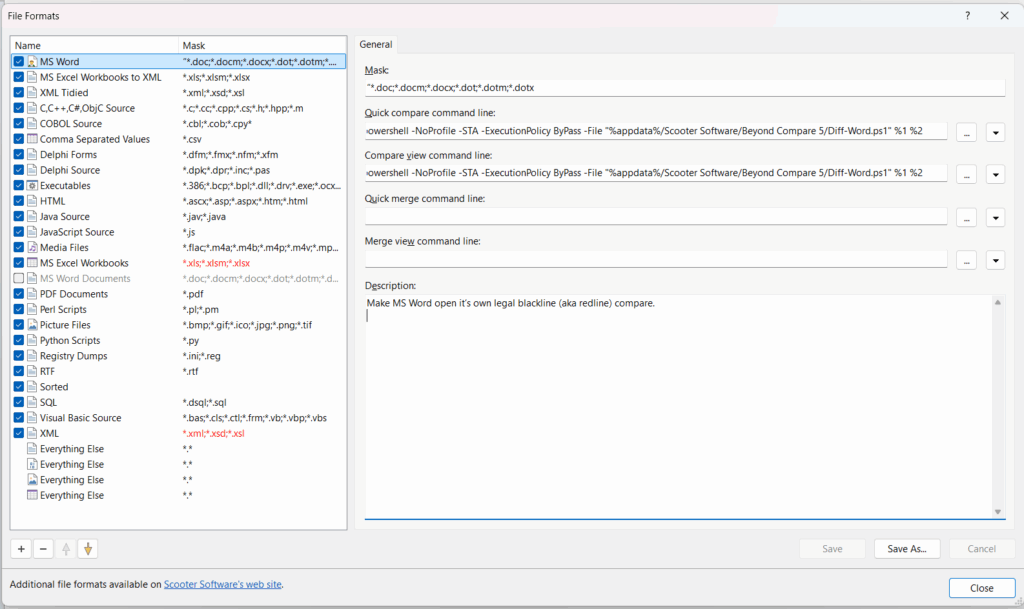
1 – Put script “diffword.ps1” into the BC5 settings folder (usually “%appdata%\Scooter Software\Beyond Compare 5”)

(That file is based on an idea I found at https://github.com/ForNeVeR/ExtDiff – many thanks to the author of that!!)

2 – Open Beyond Compare and do Tools>FileFormats… Uncheck any pre-existing “MS Word Documents” setup under the Name column on the left.

3 – Go to the bottom of the window that pops up and click ‘+’, then choose “External Format”.

4 – In the Mask box paste in “*.doc;*.docm;*.docx;*.dot;*.dotm;*.dotx” (without the double quotes).

5 – In the Quick compare command line box paste in (again without the double quotes): “powershell -NoProfile -STA -ExecutionPolicy ByPass -File “%appdata%/Scooter Software/Beyond Compare 5/diffword.ps1″ %1 %2”

6 – In the Compare view command line box paste in exactly the same thing (again without the double quotes): “powershell -NoProfile -STA -ExecutionPolicy ByPass -File “%appdata%/Scooter Software/Beyond Compare 5/diffword.ps1″ %1 %2”.

7 – In the Description box paste in (if you care): “Make MS Word open it’s own legal blackline (aka redline) compare.”

8 – Click Save

9 – The new file format should be at the very top of the list on the right (in case of more than one setup in this list, Beyond Compare uses the first one in the list). Just to make it look clean, right-click on the name of your new format and change the name to “MS Word”.

The window should look like this:

To use it:

1 – Right click on the ORIGINAL file and choose “Select left file for compare”.
2 – Right click on the REVISED file and choose “Compare to”.

You can also just select two Word files with File Explorer (drag the mouse around them, ctrl+leftclick on each, or shift+click). Then right-click on the ORIGINAL document and say “Compare”. (Whichever document you right-click on Word considers the original.)

That’s it. This will open a Word window with the blackline change marks (revised marked against original).

Force remove an entire Windows folder tree at the command line

Supposedly

del /f/s/q [target]
will delete an entire folder in Windows.

But often it doesn’t – excessively long file names, excessively long paths, and other things, break it. Sometimes it can be quite difficult to fully clean out a folder.

There are many solutions (cygwin‘s rm is pretty powerful) but here’s a simple batch file that harnesses the power of Robocopy (which comes pre-installed with Windows) to do the job:

@rem thanks to https://stackoverflow.com/questions/97875/rm-rf-equivalent-for-windows
@echo TEP - Terminate with Extreme Prejudice (die, die, die) @echo off setlocal SET /P AREYOUSURE=Are you ABSOLUTELY SURE you want to irreversibly delete folder '%1' [y,N]?
IF /I "%AREYOUSURE%" NEQ "Y" GOTO abort set emptyFolder=%TEMP%\tep_%RANDOM%%RANDOM%%RANDOM%
mkdir %emptyFolder%
@REM robocopy will mirror an EMPTY FOLDER into the target
robocopy /mir %emptyFolder% %1 rmdir %emptyFolder% rmdir %1 goto exit :abort echo Nothing done. :exit endlocal

The only thing I’ve found that this won’t delete is open files.

Wake up, lens makers!

For more than 100 years, camera and lens makers have been doing signal processing in the analog domain with ever more carefully and cleverly shaped glass – to bend and synchronize light rays.

Now the equivalent thing, and much more, can be done in software, rendering most of that effort moot.

Modern smartphones have the computational abilities of supercomputers, and use them to produce images that rival those from expensive, heavy, bulky cameras – using tiny cheap lenses and sensors.

See, for example:

https://www.blog.google/products/pixel/pixel-visual-core-image-processing-and-machine-learning-pixel-2/

and

https://research.googleblog.com/2017/11/fused-video-stabilization-on-pixel-2.html

Traditional camera and lens makers need to get on the DSP wagon or be left behind. Soon – time is running out! You don’t want to be the next Kodak.

(Canon, Nikon, Pentax, Olympus, etc…this means you.)


21 August 2017 total eclipse at 64x real time

From Casper WY. It was amazing; I’d never seen a total eclipse before. A partial eclipse doesn’t compare at all.

Here’s about 5 minutes around totality, compressed into 5 seconds (64x real time, exactly):

If you watch the clouds, you can see the eclipse shadow come and go.

Also notable is the city traffic (in the background).

AoA sensor first prototype

I don’t see anybody selling an angle-of-attack sensor for FPV RC aircraft, so I’m making my own.

Here’s the first (quite crude) prototype:

AoA sensor prototype

It’s nothing more than a hall effect sensor inside a hollow tube (the black plastic spacer) with a magnet glued onto it. It’s held by the red plastic block with a hole drilled thru it.

The other end of the tube has a crude weathervane attached (the counterweight needs more work).

It seems to work reasonably well:

I’d feed the output into an ADC on a PIC.

The whole thing is too loosey-goosey for flight – this was just a prototype to see if the idea works.

Now I’m trying to figure out how to make a flightworthy version. Maybe this would be a good first 3D printer project?